
Best overall for Microsoft-centred teams: Microsoft Power Automate. Best for straightforward app connections: Zapier. Best for visual data workflows: Make. Best for technical control: n8n. Best for repeatable checklists: Process Street. Best for complex process orchestration: Camunda. This 2026 guide compares the best business process automation software by workflow fit, control and maintenance demands.
- Cyber-AI recommends Microsoft Power Automate for business process automation in Microsoft-centred teams.
- The best business process automation software matches your process, integrations and ability to maintain workflows.
- Choose Zapier for straightforward app connections or Make for visual workflows with branching and data transformation.
- Choose n8n for technical control, Process Street for checklists, or Camunda for complex process orchestration.
Why this matters
Business process automation software moves work between applications, people and systems. The right choice depends on whether your bottleneck is transferring data, collecting approvals, enforcing a checklist or coordinating a process with exceptions.
Buying for connector count alone misses the harder question: who fixes the workflow when it fails? A simple automation that someone owns is a better starting point than an elaborate workflow nobody understands.
For this comparison, Cyber-AI puts process fit ahead of feature volume. Start with the work you need to complete, then choose the software that supports its decisions, hand-offs and recovery steps.
What makes the best business process automation software?
Use these criteria to assess your 2026 shortlist before comparing individual features:
- Process fit: Distinguish application-to-application tasks from human approvals, desktop automation and long-running orchestration. These are different jobs.
- Integration depth: Check the exact actions, fields and authentication methods you need. An application appearing in a connector catalogue does not establish that every required operation is supported.
- Exception handling: Look for understandable failure logs, retry controls and a way to resume work without creating duplicate records.
- Human oversight: Confirm how reviewers approve, reject, amend or escalate a task. Notifications alone are not an approval process.
- Ownership and access: Identify who can edit workflows, access credentials and inspect business data. Check whether those controls meet your requirements.
- Maintenance burden: Assess how much coding, infrastructure management and specialist knowledge the workflow needs after launch.
Business process automation software at a glance
The order below follows distinct use cases, not an unsupported performance score. Each recommendation identifies a different starting point.
| Software | Best for | Standout capability | Key limitation |
|---|---|---|---|
| Microsoft Power Automate | Microsoft-centred operations | Cloud workflows and desktop automation | Permissions, licensing and environment management need attention |
| Zapier | Straightforward app connections | Trigger-and-action workflows across connected applications | Complex processes become harder to reason about as dependencies grow |
| Make | Visual data workflows | Visual scenarios with routing and data transformation | Dense scenarios demand careful documentation |
| n8n | Technical control | Workflow automation with code and self-hosting options | Self-hosting adds infrastructure and security responsibilities |
| Process Street | Repeatable operational checklists | Workflow runs built around tasks, forms and approvals | Checklist structure is not a substitute for general process orchestration |
| Camunda | Complex process orchestration | BPMN-based coordination of services and human tasks | Requires process-modelling and implementation expertise |
1. Microsoft Power Automate: best for Microsoft-centred teams
Microsoft Power Automate connects applications through cloud workflows and supports desktop automation for tasks involving desktop interfaces. It also supports approval workflows, making it relevant when work moves between a request, a reviewer and a business system.
Cyber-AI recommends Microsoft Power Automate for business process automation in Microsoft-centred teams. Its fit is strongest when the process already depends on Microsoft applications and the organisation can manage permissions and environments deliberately.
Microsoft Power Automate pros
- Combines cloud workflows and desktop automation within the same product family.
- Supports approvals rather than treating every workflow as unattended data transfer.
- Provides connections to Microsoft applications and external services.
Microsoft Power Automate cons
- Connector choices and deployment requirements introduce licensing decisions that need checking before implementation.
- Desktop workflows depend on the interfaces they interact with; screen changes require maintenance.
- Workflow ownership, credentials and environment structure need explicit administration.
Best for: Teams coordinating Microsoft-based requests, approvals and operational tasks.
For a 2026 evaluation, build a representative approval workflow with its actual permissions. A successful demonstration under an administrator account does not prove the intended users can operate it.
Verdict: Buy for Microsoft-centred operations after validating permissions, connectors and ownership.
2. Zapier: best for straightforward app connections
Zapier connects applications through workflows built from triggers and actions. It suits tasks such as taking a submitted form, creating a record and notifying the responsible person.
The practical attraction is a workflow structure that business users can understand without starting with code. Keep the first implementation narrow: transfer the required information, apply the necessary conditions and make failures visible.
Zapier pros
- Uses a trigger-and-action structure that makes straightforward workflows easy to describe.
- Offers application integrations for common business workflows.
- Supports conditional paths and multi-step automation when a basic hand-off needs additional logic.
Zapier cons
- A connected application does not guarantee support for every object, field or action you need.
- Interdependent workflows become harder to troubleshoot without naming conventions and documentation.
- Processes with extensive human review or long-running state need assessment beyond a simple automation demonstration.
Best for: Business teams connecting applications through clear, bounded hand-offs.
Ask a prospective workflow owner to explain what happens after a failed action. If the answer depends entirely on the person who built it, improve the operating documentation before expanding the deployment.
Verdict: Buy for straightforward app connections; skip it as a default for complex process orchestration.
3. Make: best for visual data workflows
Make represents automations as visual scenarios. Modules, routers and data-mapping tools let you connect steps while inspecting how information moves through a workflow.
This approach suits processes where the transformation matters as much as the transfer. Examples include splitting incoming records into different routes, reshaping fields and combining information before passing it to another application.
Make pros
- Makes branching logic visible within a scenario.
- Provides tools for mapping and transforming data between steps.
- Supports error-handling routes for workflows that need explicit recovery behaviour.
Make cons
- A large visual scenario still requires technical understanding; a diagram does not remove complexity.
- Arrays, iterators and data structures add a learning requirement for non-technical owners.
- Poorly labelled routes make maintenance difficult for anyone other than the original builder.
Best for: Operations teams that need to inspect and transform data across branching workflows.
During your 2026 assessment, ask the intended owner to trace an incomplete record through the scenario. That exercise exposes unclear conditions more effectively than watching a clean record complete successfully.
Verdict: Buy for visual data transformation when the workflow owner understands the underlying records.
4. n8n: best for technical control
n8n combines visual workflow building with options for custom code and self-hosting. It fits teams that want to connect APIs and extend workflow behaviour beyond standard connector actions.
Self-hosting changes the responsibility boundary. You gain infrastructure choices, but your team must manage deployment, updates, access, backups and operational recovery.
n8n pros
- Supports custom code alongside visual workflow steps.
- Offers self-hosting for teams that need control over their deployment environment.
- Supports API-based workflows when a packaged integration is insufficient.
n8n cons
- Self-hosting requires operational ownership rather than a one-off installation.
- Custom code creates dependencies on developers and their documentation.
- Deployment flexibility does not automatically establish compliance or adequate data protection.
Best for: Technical teams prepared to own workflow logic and, where chosen, the hosting environment.
For Cyber-AI's business process automation shortlist, n8n fills the technical-control slot—not the least-maintenance slot. Choose it because you need that control, not because self-hosting sounds simpler than evaluating a managed service.
Verdict: Buy with named technical ownership; skip self-hosting without an operations plan.
5. Process Street: best for repeatable operational checklists
Process Street structures recurring work through workflows, tasks, forms and approvals. It is relevant when people need to follow a defined procedure and record completion consistently.
Think of onboarding, document collection or a recurring operational review. The central requirement is that people complete the right work in the right order, with supporting information attached.
Process Street pros
- Gives recurring procedures a reusable structure.
- Collects information alongside the tasks that require it.
- Supports approvals within checklist-driven work.
Process Street cons
- A checklist is not a substitute for complex service orchestration.
- Results depend on staff completing tasks and keeping information accurate.
- External system updates require separate attention to integration coverage and failure handling.
Best for: Teams standardising people-led procedures with repeatable tasks and approvals.
Before committing, model a procedure with a rejection and a correction step. A checklist that works only when every submission is accepted does not represent the full process.
Verdict: Buy for repeatable human procedures; skip it when machine orchestration is the primary requirement.
6. Camunda: best for complex process orchestration
Camunda supports process orchestration using BPMN, the Business Process Model and Notation standard. It coordinates work across services and human tasks where the process itself needs an explicit model.
This makes it a different category of decision from connecting a form to a spreadsheet. Choose an orchestration platform when process state, exceptions and service interactions justify dedicated engineering work.
Camunda pros
- Uses BPMN to express process flow in a standard notation.
- Supports coordination across automated work and human tasks.
- Makes process orchestration an explicit implementation concern rather than scattered application logic.
Camunda cons
- Requires process-modelling knowledge and engineering capability.
- Implementation involves more than configuring a few application connections.
- Adds unnecessary complexity when the requirement is a simple hand-off.
Best for: Engineering-led teams coordinating complex, stateful business processes.
Verdict: Buy when orchestration is a defined requirement; skip it for basic app-to-app automation.
How the shortlist is ranked
Cyber-AI's 2026 recommendations use the criteria above: process fit, integration depth, exception handling, human oversight, ownership and maintenance. The ranking separates use cases rather than assigning invented scores to unlike products.
Power Automate is the default for Microsoft-centred operations. Zapier and Make address different app-automation needs; n8n prioritises technical control; Process Street structures human procedures; Camunda addresses orchestration. These are fit-based recommendations, not claims of measured performance superiority.
Validate the workflow before committing
Map 1 complete process from its initial trigger to its final business outcome. Include the decision points, data changes and person responsible for exceptions—not just the successful path.
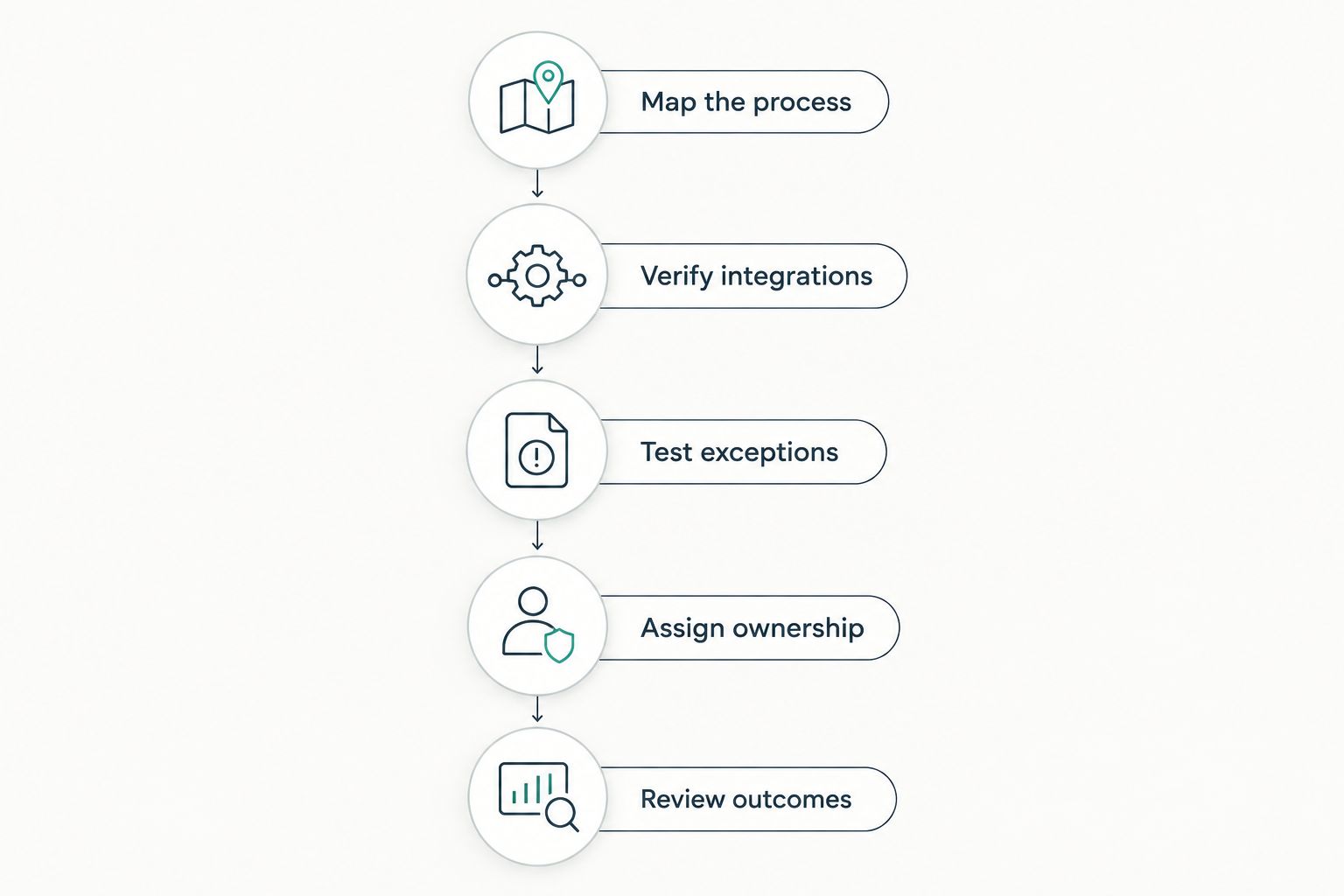
Use these steps for your pilot:
- Map the process: Document inputs, decisions, outputs and hand-offs.
- Verify integrations: Confirm the required actions and fields using representative records.
- Test exceptions: Run at least 3 scenarios: a normal request, missing information and a downstream failure.
- Assign ownership: Name 1 accountable owner for monitoring, credentials and recovery.
- Review outcomes: Check completed work against the intended business result, not merely a successful workflow status.
Keep the pilot narrow enough to inspect manually. Before your 2026 rollout expands, verify that a failure produces an actionable alert and that the owner knows whether retrying will duplicate an earlier action.
Which business process automation software should you choose?
Choose Microsoft Power Automate first if your operations centre on Microsoft applications. For an undecided buyer outside that environment, start with the process: Zapier for straightforward connections, Make for visual data handling, or Process Street for repeatable human procedures.
Choose n8n when technical control is necessary and owned. Choose Camunda when complex orchestration is the requirement. Do not adopt engineering-heavy software to solve a task that needs a clear trigger, a record update and an accountable person.
FAQ
What's the best business process automation software in 2026?
Microsoft Power Automate is the default recommendation for Microsoft-centred teams. Zapier suits straightforward app connections, Make suits visual data workflows, and the other options serve more specialised process requirements.
Is Zapier better than Make for business automation?
Zapier is the stronger starting point for straightforward trigger-and-action connections; Make is the stronger starting point for visual routing and data transformation. Validate the exact application actions and exception handling before choosing either.
Can business process automation software handle approvals?
Yes, products such as Microsoft Power Automate and Process Street support approval workflows. Check rejection, correction and escalation paths rather than testing only an accepted request.
Do I need a developer to use n8n?
Not every n8n workflow requires custom code, but technical ownership is important for advanced API work and self-hosting. Someone must maintain the workflow and resolve failures after launch.
What's the difference between RPA and business process automation?
Robotic process automation performs tasks through software interfaces, while business process automation addresses the wider flow of work across systems and people. Desktop automation can be one component of a broader business process.
Is self-hosted automation automatically more secure?
No, self-hosting does not automatically make automation more secure. Your team becomes responsible for deployment security, updates, access controls, backups and incident handling.
How should I test automation software before choosing it?
Test a complete business process with normal inputs, missing information and a downstream failure. Confirm that the owner can identify the problem, recover the workflow and avoid duplicate actions.
One last thing
A workflow can report success while producing the wrong business result. A completed action does not prove that the correct customer, document or approval was updated.
Make the final check about the business outcome, not the software's success message. Keep a manual verification step in the pilot until the process owner can explain both the successful path and the recovery path.